TECHNOLOGY PARTNER SOLUTIONS

STENTOFON Security Solutions

Designed, installed, integrated, and supported by Southeastern Security Professionals.

SSP helps organizations plan, deploy, integrate, and support STENTOFON technology across commercial environments with professional implementation and long-term lifecycle service.

Design. Integration. Deployment. Lifecycle support.
WHY SSP FOR STENTOFON

A Full-Service STENTOFON Partner

SSP supports STENTOFON communication environments from planning through installation, integration, service, upgrades, and long-term expansion.

Whether you are planning a new deployment, expanding an existing system, or taking over an environment that needs better support, our team focuses on how the technology needs to work in your facility - not just what equipment goes on the wall.

✓ System design and engineering
✓ Professional installation
✓ Access and video integration
✓ Existing system takeovers
✓ Service and lifecycle support
✓ Expansions and upgrades
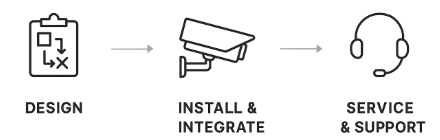
SSP Avigilon design installation and service

Full-Service Security From Start to Finish

Design

Plan the right system around your facility, risks, and workflows.

Install

Deploy hardware and software with professional installation.

Integrate

Connect video, access control, analytics, and operational workflows.

Service & Maintain

Support, troubleshoot, upgrade, and expand the system over its lifecycle.

STENTOFON SOLUTION OPTIONS

Explore STENTOFON Solutions

STENTOFON systems support IP intercom, critical communication, secure entry, help points, and operator workflows. SSP helps design endpoints, call routing, integrations, and support around each facility.

INTERCOM1

IP Intercom

Intercom stations and endpoints support secure entry, assistance, and clear two-way communication across commercial environments.

  • Door and entry stations
  • Help and emergency points
  • Operator and master stations
  • Clear two-way audio
  • Flexible endpoint expansion
CRITICAL COMMS2

Critical Communication

Centralized communication and routing help security and operations teams manage calls, assistance requests, and urgent events.

  • Call routing and prioritization
  • Emergency communication workflows
  • Control-room coordination
  • Event-based communication
  • Security-system integration
1

Door Intercom & Hardware

Connect visitors and staff at secured entrances with clear voice communication and coordinated entry workflows.

2

Help Points

Emergency and assistance stations provide a direct communication path to security or operations teams.

3

Control Room Communication

Operator stations help teams receive, prioritize, and manage communication across larger or distributed facilities.

4

Critical Audio

Support urgent and operational communication with clear audio across targeted areas.

5

Integrations & Automation

Coordinate intercom events with access control, video, and other security systems where supported.

6

Service & Lifecycle Support

Ongoing troubleshooting, system health support, expansions, upgrades, and planning as your STENTOFON environment changes over time.

BUILT AROUND YOUR ENVIRONMENT

STENTOFON Across the Industries SSP Serves

The same platform can solve very different problems depending on the site. SSP designs around the people, workflows, risk profile, and infrastructure unique to each environment.

HealthcareSupport entrances, sensitive areas, staff workflows, and patient-facing spaces with technology configured for reliability, visibility, and day-to-day operations.
ManufacturingImprove visibility and control across employee entrances, production areas, warehouses, loading zones, and high-value assets while supporting safety and uptime.
EducationStrengthen campus operations across entrances, classrooms, administration buildings, events, and shared spaces with scalable systems that are easier to manage.
GovernmentProtect public-facing facilities, restricted areas, and critical operations with dependable technology, centralized management, and clear response workflows.
TransportationSupport terminals, yards, gates, loading areas, vehicle access points, and distributed facilities with systems built for high traffic and continuous operations.
Multi-FamilyImprove resident, visitor, amenity, parking, and property-wide security with technology that supports controlled access, visibility, and simpler management.

THE SSP PROCESS

From First Site Visit to Long-Term Support

1

Assess

Review the site, existing systems, risks, workflows, and goals.

2

Design

Select the right STENTOFON stations, call routing, integrations, and operating workflows.

3

Install

Deploy hardware, configure software, and coordinate infrastructure requirements.

4

Integrate & Train

Test workflows, connect systems, commission the environment, and train users.

5

Support

Maintain, troubleshoot, expand, and optimize the system over its lifecycle.

STENTOFON FAQ

Common Questions

What types of facilities can STENTOFON support?

STENTOFON communication systems can support entrances, help points, control rooms, and other locations that require dependable two-way or critical communication.

Can SSP work with an existing STENTOFON system?

Yes. SSP can assess existing stations, call routing, integrations, and expansion needs before recommending service or upgrades.

Can STENTOFON integrate with other security systems?

Depending on the installed products and integrations, STENTOFON communication events can be coordinated with access control, video, and other security workflows.

Can SSP expand or upgrade a STENTOFON system?

Yes. SSP can evaluate the existing environment, add compatible stations, improve routing and integrations, replace aging components, and provide ongoing service.

NEXT STEPS

Ready to Evaluate or Upgrade Your STENTOFON Environment?

Talk with SSP about STENTOFON design, installation, integration, expansion, and ongoing support.

Talk to a STENTOFON SpecialistCommercial security support from SSP
x

Fill Out The Form Below To Request A Consultation

Thank you. An SSP representative will be in touch.
Oops! Something went wrong while submitting the form.